Purpose
Return value
Syntax
=ASINH(number)
- number - The number to get the inverse hyperbolic sine of.
Using the ASINH function
The Excel ASINH function returns the inverse hyperbolic sine of a number. Given one as input, the function returns 0.881373587 as output.
=ASINH(1) // returns 0.881373587
Explanation
The inverse hyperbolic sine returns the hyperbolic angle of the point on the unit hyperbola with a y -coordinate equal to the input. For example, given one as input representing the point on the unit hyperbola with a y -coordinate of one, the inverse hyperbolic sine returns the hyperbolic angle of 0.881373587.
=ASINH(1) // returns 0.881373587

Given an input of -2 corresponding to the point on the unit hyperbola with a y -coordinate of negative one, the inverse hyperbolic sine returns the hyperbolic angle of -1.443635475.
=ASINH(-2) // returns -1.443635475

The output of the inverse hyperbolic sine function is visualized in this plot:

Images courtesy of wumbo.net .
Purpose
Return value
Syntax
=ATAN(number)
- number - The value to get the inverse tangent of.
Using the ATAN function
The Excel ATAN function returns the inverse tangent or arc-tangent of a number. In geometric terms, the function returns the angle of a right-triangle given the ratio of its opposite side over its adjacent side. The ATAN function is the inverse of the TAN function. For example, if the length of a right-triangle’s adjacent side is 3 and the length of its opposite side is 3 to find the angle of the triangle the formula is:
=ATAN(3/3) // Returns 0.785 radians
Convert Result to Degrees
ATAN returns the angle in radians. To convert the result from radians to degrees, multiply the result by 180/PI() or use the DEGREES function . For example, to convert the result of ATAN(1) to degrees, you can use either formula below:
=ATAN(1)*180/PI() // Returns 45 degrees
=DEGREES(ATAN(1)) // Returns 45 degrees
Difference Between ATAN and ATAN2
The ATAN2 function is useful for getting the angle corresponding to a point in the Cartesian Coordinate System which forms the shape of a right-triangle. For points in the first and fourth quadrants of the coordinate system, ATAN and ATAN2 will return the same angle as expressed in the formula:
=ATAN(y/x)=ATAN2(x,y)
For points in the second and third quadrants of the coordinate system, the ATAN function will return the angle relative to the negative x-axis direction. The ATAN2 function, by comparison, returns the angle relative to the positive x-axis which is the standard for measuring angles.

Graph
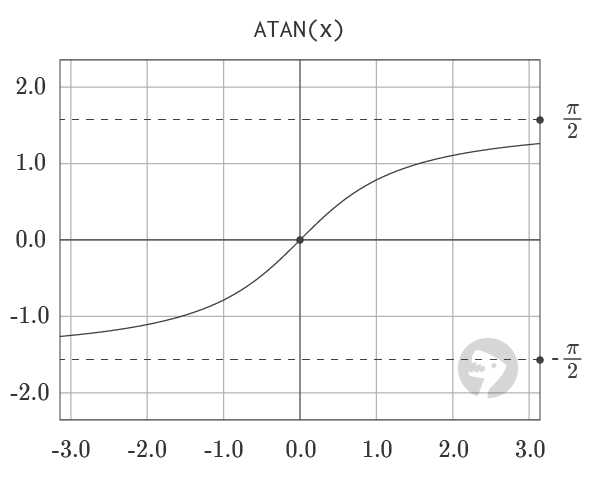
The graph of ATAN, shown above, visualizes the output of the function. Output of the function is limited to the range from -π/2 to π/2.
Images courtesy of wumbo.net .
