Explanation
This formula is a classic example of a nested IF formula that tests threshold values in ascending order. To match the schedule shown in G5:G11, the formula first checks the late by time in D5 to see if it’s less than 5 minutes. If so, zero points are assigned:
IF(D5<VALUE("0:05"),0,
If the result of the logical test above is FALSE, the formula checks to see if D5 is less than the next threshold, which is 15 minutes:
IF(D5<VALUE("0:15"),1,
The same pattern repeats at each threshold. Because the tests are run in order, from smallest to largest, there is no need for more complicated bracketing.
The VALUE function is used to make Excel treat time value at each threshold as a number instead of next.
Note: you can also use VLOOKUP to replace nested IFs if you like.
Explanation
At the core, this formula subtracts start time from end time to get duration in hours. This is done to calculate both work time and break time.
MOD(C6-B6,1) // get work time
MOD(E6-D6,1) // get break time
Next, break time is subtracted from work time to get “net” work hours.
This formula uses the MOD function to handle times that cross a day boundary (midnight). By using MOD with a divisor of 1, positive results are unchanged, but negative results (which occur when the start time is greater than the end time) are “flipped” to get a correct duration.
For more details, see: How to calculate number of hours between two times
Formatting time durations
In cases where the calculated time exceeds 24 hours, you may want to use a custom format like [h]:mm. The square bracket syntax [h] tells Excel to display hour durations greater than 24 hours. If you don’t use the brackets, Excel will simply “roll over” when the duration hits 24 hours (like a clock).
Alternative timesheet layout
The screenshot below shows an alternative format to capture time worked. Instead of logging work and break time separately, this version captures two separate in/out times for a single shift.
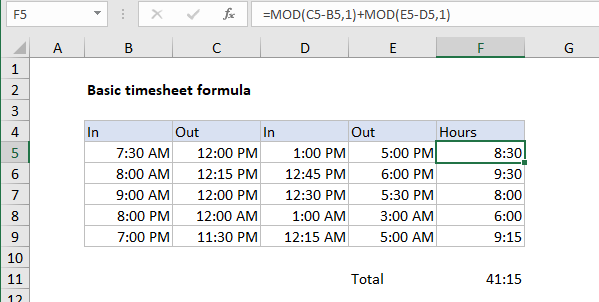
For this layout, the formula used in F5 is:
=MOD(C5-B5,1)+MOD(E5-D5,1)
Instead of subtracting break time from work time, we add together the two work times.
