Purpose
Return value
Syntax
=ATAN2(x_num,y_num)
- x_num - The x coordinate of the input point.
- y_num - The y coordinate of the input point.
Using the ATAN2 function
The Excel ATAN2 function returns the arctangent from the x and y coordinates of a point. In geometric terms, the function returns the radian angle corresponding to the coordinates of the input point. If you imagine a ray starting from the origin of the coordinate system and extending outwards, every point along the ray will return the same angle value. A circle of radius one demonstrates all possible return values for the function.
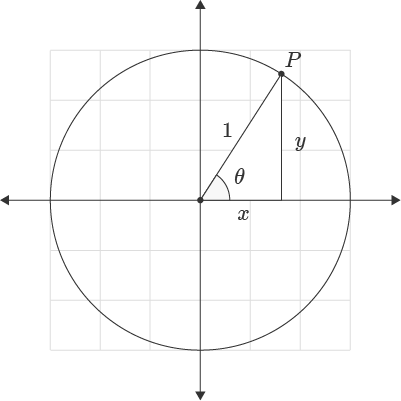
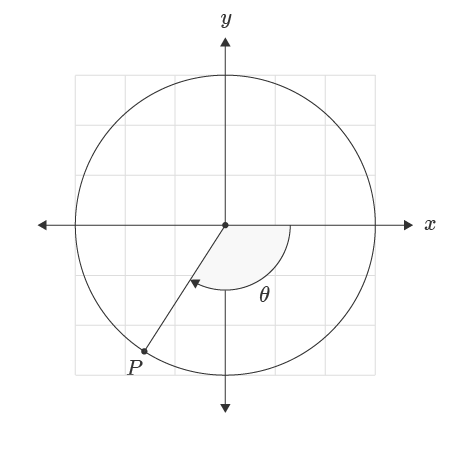
For negative y-values the function returns a negative angle. An angle is measured from the positive x-axis direction with the positive direction in the counter-clockwise direction and the negative direction in the clockwise direction.
Convert Output to Degrees
To convert the output of the ATAN2 function from radians to degrees the formula is:
=ATAN2(x,y)*180/PI() // Returns angle in degrees
Alternatively, the degrees formula can be used to convert the angle to degrees.
=DEGREES(ATAN2(x,y))// Returns angle in degrees
Difference Between ATAN and ATAN2
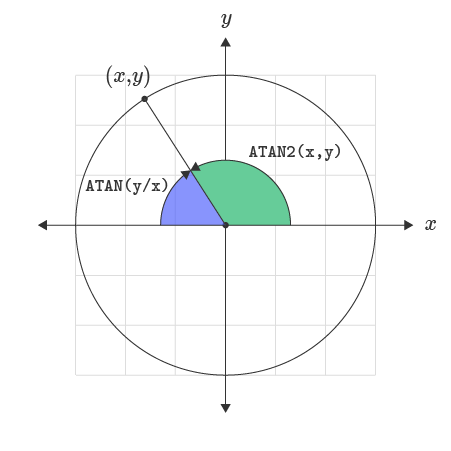
For points in the first and fourth quadrant, the ATAN2 function returns identical output to the ATAN function. This relationship is expressed in the formula below:
= ATAN2(x,y) = ATAN(y/x)
For points in the second and third quadrant, the ATAN function returns the angle relative to the negative x-direction axis.
Purpose
Return value
Syntax
=ATANH(number)
- number - The number to get the inverse hyperbolic tangent of.
Using the ATANH function
The Excel ATANH function returns the inverse hyperbolic tangent of a number. Given 0.5 as input, the function returns 0.549306144 as output.
=ATANH(0.5) // returns 0.549306144
Explanation
The hyperbolic arc tangent function is the inverse of the TANH function.
=ATANH(TANH(x)) // returns x
The plot below shows the output of the ATANH function in Excel.

Notes:
- Given output greater than or equal to 1.0 or less than or equal to -1.0, throws a #NUM error.
