Purpose
Return value
Syntax
=CONVERT(number,from_unit,to_unit)
- number - The numeric value to convert.
- from_unit - The starting units for number.
- to_unit - The ending units for the result.
Using the CONVERT function
The CONVERT function converts a number in one measurement system to another. For example, you can use CONVERT to convert feet into meters, pounds into kilograms, gallons into liters, and for many other unit conversions.
The CONVERT function is case-sensitive. You must supply units as shown below. For example, to convert yards to meters, use a lowercase “yd” and lowercase “m”, like this: =CONVERT(100,“yd”,“m”)
Examples
The formulas below use the CONVERT function to convert yards to meters, Celsius to Fahrenheit, gallons to liters, and square meters to square yards:
=CONVERT(100,"yd","m") // returns 91.44
=CONVERT(22,"C","F") // returns 71.6
=CONVERT(1,"gal","l") // returns 3.79
=CONVERT(100,"m2","ft2") // returns 1076.39
To round the results returned by CONVERT, nest CONVERT inside the ROUND function :
=ROUND(CONVERT(100,"yd","m"),0) // yards to meters, returns 91
=ROUND(CONVERT(5,"mi","km"),1) // miles to kilometers, returns 8.0
=ROUND(CONVERT(150,"lbm","kg"),1) // pounds to kilograms, returns 68.0
Conversion categories
The tables below show the units available to the CONVERT function in each category. In all cases, Unit can be used for either from_unit or to_unit in the same category.
- Mass
- Distance
- Time
- Pressure
- Force
- Energy
- Power
- Magnetism
- Temperature
- Liquid
- Volume
- Area
- Information
- Metric prefixes
- Binary prefixes
Mass
Use these units to convert between different measures of weight and mass. This is useful for recipes, shipping calculations, and scientific applications. For example:
=CONVERT(150,"lbm","kg") // pounds to kilograms, returns 68.04
=CONVERT(500,"g","ozm") // grams to ounces, returns 17.64
=CONVERT(1,"stone","lbm") // stone to pounds, returns 14
| Mass | Unit |
|---|---|
| Gram | “g” |
| Slug | “sg” |
| Pound mass (avoirdupois) | “lbm” |
| U (atomic mass unit) | “u” |
| Ounce mass (avoirdupois) | “ozm” |
| Grain | “grain” |
| U.S. (short) hundredweight | “cwt” or “shweight” |
| Imperial hundredweight | “uk_cwt” or “lcwt” (“hweight”) |
| Stone | “stone” |
| Ton | “ton” |
| Imperial ton | “uk_ton” or “LTON” (“brton”) |
Distance
These units allow you to perform conversions related to length and distance. For example:
=CONVERT(5,"mi","km") // miles to kilometers, returns 8.05
=CONVERT(6,"ft","m") // feet to meters, returns 1.83
=CONVERT(100,"cm","in") // centimeters to inches, returns 39.37
| Distance | Unit |
|---|---|
| Meter | “m” |
| Statute mile | “mi” |
| Nautical mile | “Nmi” |
| Inch | “in” |
| Foot | “ft” |
| Yard | “yd” |
| Angstrom | “ang” |
| Ell | “ell” |
| Light-year | “ly” |
| Parsec | “parsec” or “pc” |
| Pica (1/72 inch) | “Picapt” or “Pica” |
| Pica (1/6 inch) | “pica” |
| U.S survey mile (statute mile) | “survey_mi” |
Time
Convert between different units of time with these options. For example:
=CONVERT(2.5,"hr","min") // hours to minutes, returns 150
=CONVERT(90,"mn","hr") // minutes to hours, returns 1.5
=CONVERT(1,"day","sec") // days to seconds, returns 86400
| Time | Unit |
|---|---|
| Year | “yr” |
| Day | “day” or “d” |
| Hour | “hr” |
| Minute | “mn” or “min” |
| Second | “sec” or “s” |
Pressure
Use these units for pressure-related conversions, commonly needed in engineering and scientific contexts. For example:
=CONVERT(1,"atm","psi") // atmospheres to PSI, returns 14.70
=CONVERT(30,"psi","Pa") // PSI to pascals, returns 206842.7188
=CONVERT(760,"mmHg","atm") // mmHg to atmospheres, returns 1
| Pressure | Unit |
|---|---|
| Pascal | “Pa” (or “p”) |
| Atmosphere | “atm” (or “at”) |
| mm of Mercury | “mmHg” |
| PSI | “psi” |
| Torr | “Torr” |
Force
These units handle conversions related to force, useful in physics and engineering calculations. For example:
=CONVERT(100,"N","lbf") // newtons to pound-force, returns 22.48
=CONVERT(50,"lbf","N") // pound-force to newtons, returns 222.41
=CONVERT(1,"N","dyn") // newtons to dynes, returns 100000
| Force | Unit |
|---|---|
| Newton | “N” |
| Dyne | “dyn” (or “dy”) |
| Pound force | “lbf” |
| Pond | “pond” |
Energy
Convert between various energy units with these options. This is helpful for comparing energy consumption, nutritional values, and fuel efficiency. For example:
=CONVERT(1000,"J","cal") // joules to calories, returns 238.846
=CONVERT(1,"BTU","Wh") // BTU to watt-hours, returns 0.293
=CONVERT(100,"cal","J") // calories to joules, returns 418.68
| Energy | Unit |
|---|---|
| Joule | “J” |
| Erg | “e” |
| Thermodynamic calorie | “c” |
| IT calorie | “cal” |
| Electron volt | “eV” (or “ev”) |
| Horsepower-hour | “HPh” (or “hh”) |
| Watt-hour | “Wh” (or “wh”) |
| Foot-pound | “flb” |
| BTU | “BTU” (or “btu”) |
Power
Use these units for power-related conversions, such as comparing engine ratings or electrical consumption. For example:
=CONVERT(1,"HP","W") // horsepower to watts, returns 745.7
=CONVERT(1500,"W","HP") // watts to horsepower, returns 2.01
=CONVERT(100,"HP","kW") // horsepower to kilowatts, returns 74.57
| Power | Unit |
|---|---|
| Horsepower | “HP” (or “h”) |
| Pferdestärke | “PS” |
| Watt | “W” (or “w”) |
Magnetism
These units allow conversions between magnetic field strength measurements. For example:
=CONVERT(1,"T","ga") // tesla to gauss, returns 10000
=CONVERT(5000,"ga","T") // gauss to tesla, returns 0.5
| Magnetism | Unit |
|---|---|
| Tesla | “T” |
| Gauss | “ga” |
Temperature
Convert between temperature scales with these units. Unlike other conversions, temperature conversions involve both scaling and offset adjustments. For example:
=CONVERT(32,"F","C") // Fahrenheit to Celsius, returns 0
=CONVERT(100,"C","F") // Celsius to Fahrenheit, returns 212
=CONVERT(0,"C","K") // Celsius to Kelvin, returns 273.15
| Temperature | Unit |
|---|---|
| Degree Celsius | “C” (or “cel”) |
| Degree Fahrenheit | “F” (or “fah”) |
| Kelvin | “K” (or “kel”) |
| Degrees Rankine | “Rank” |
| Degrees Réaumur | “Reau” |
Liquid
Use these units for liquid volume conversions, ideal for cooking, beverage calculations, and fuel measurements. Note the distinction between U.S. and U.K. (Imperial) measures. For example:
=CONVERT(1,"gal","l") // US gallons to liters, returns 3.79
=CONVERT(2,"cup","ml") // cups to milliliters, returns 473.18
=CONVERT(1,"uk_gal","gal") // UK gallons to US gallons, returns 1.20
| Liquid measure | Unit |
|---|---|
| Teaspoon | “tsp” |
| Modern teaspoon | “tspm” |
| Tablespoon | “tbs” |
| Fluid ounce | “oz” |
| Cup | “cup” |
| U.S. pint | “pt” (or “us_pt”) |
| U.K. pint | “uk_pt” |
| Quart | “qt” |
| Imperial quart (U.K.) | “uk_qt” |
| Gallon | “gal” |
| Imperial gallon (U.K.) | “uk_gal” |
| Liter | “l” or “L” (“lt”) |
Volume
These units handle three-dimensional volume conversions, useful for shipping, storage, and construction calculations. For example:
=CONVERT(1,"m3","ft3") // cubic meters to cubic feet, returns 35.31
=CONVERT(100,"ft3","yd3") // cubic feet to cubic yards, returns 3.70
=CONVERT(1,"barrel","gal") // oil barrels to gallons, returns 42
| Volume | Unit |
|---|---|
| Cubic angstrom | “ang3” or “ang^3” |
| U.S. oil barrel | “barrel” |
| U.S. bushel | “bushel” |
| Cubic feet | “ft3” or “ft^3” |
| Cubic inch | “in3” or “in^3” |
| Cubic light-year | “ly3” or “ly^3” |
| Cubic meter | “m3” or “m^3” |
| Cubic Mile | “mi3” or “mi^3” |
| Cubic yard | “yd3” or “yd^3” |
| Cubic nautical mile | “Nmi3” or “Nmi^3” |
| Cubic Pica | “Picapt3”, “Picapt^3”, “Pica3” or “Pica^3” |
| Gross Registered Ton | “GRT” (“regton”) |
| Measurement ton (freight ton) | “MTON” |
Area
Convert between surface area measurements with these units, helpful for real estate, landscaping, and flooring projects. For example:
=CONVERT(1,"ha","us_acre") // hectares to acres, returns 2.47
=CONVERT(1000,"ft2","m2") // square feet to square meters, returns 92.90
=CONVERT(1,"mi2","km2") // square miles to square kilometers, returns 2.59
| Area | Unit |
|---|---|
| International acre | “uk_acre” |
| U.S. survey/statute acre | “us_acre” |
| Square angstrom | “ang2” or “ang^2” |
| Are | “ar” |
| Square feet | “ft2” or “ft^2” |
| Hectare | “ha” |
| Square inches | “in2” or “in^2” |
| Square light-year | “ly2” or “ly^2” |
| Square meters | “m2” or “m^2” |
| Morgen | “Morgen” |
| Square miles | “mi2” or “mi^2” |
| Square nautical miles | “Nmi2” or “Nmi^2” |
| Square Pica | “Picapt2”, “Pica2”, “Pica^2” or “Picapt^2” |
| Square yards | “yd2” or “yd^2” |
Information
Use these units to convert between digital storage measurements. Combine with metric or binary prefixes (see below) for larger units like kilobytes, megabytes, and gigabytes. For example:
=CONVERT(1,"byte","bit") // bytes to bits, returns 8
=CONVERT(1024,"byte","kbyte") // bytes to kilobytes, returns 1.024
=CONVERT(500,"Mbyte","Gbyte") // megabytes to gigabytes, returns 0.5
=CONVERT(2000,"Gbyte","Tbyte") // gigabytes to terabytes, returns 2
=CONVERT(1024,"byte","kibyte") // bytes to kibibytes, returns 1
=CONVERT(1024,"Mibyte","Gibyte") // mebibytes to gibibytes, returns 1
| Information | Unit |
|---|---|
| Bit | “bit” |
| Byte | “byte” |
Metric prefixes
The prefixes shown in the table below can be used with metric units by prepending the abbreviation to the unit. This allows you to work with very large or very small quantities. For example:
=CONVERT(1,"kg","g") // kilograms to grams, returns 1000
=CONVERT(5,"cm","m") // centimeters to meters, returns 0.05
=CONVERT(1,"MW","W") // megawatts to watts, returns 1000000
| Prefix | Multiplier | Abbreviation |
|---|---|---|
| yotta | 1E+24 | “Y” |
| zetta | 1E+21 | “Z” |
| exa | 1E+18 | “E” |
| peta | 1E+15 | “P” |
| tera | 1E+12 | “T” |
| giga | 1000000000 | “G” |
| mega | 1000000 | “M” |
| kilo | 1000 | “k” |
| hecto | 100 | “h” |
| deka | 10 | “da” or “e” |
| deci | 0.1 | “d” |
| centi | 0.01 | “c” |
| milli | 0.001 | “m” |
| micro | 0.000001 | “u” |
| nano | 0.000000001 | “n” |
| pico | 1E-12 | “p” |
| femto | 1E-15 | “f” |
| atto | 1E-18 | “a” |
| zepto | 1E-21 | “z” |
| yocto | 1E-24 | “y” |
Binary prefixes
The binary unit prefixes below can be used with “bits” and “bytes”. Unlike metric prefixes that use powers of 10, binary prefixes use powers of 2, which is how computers actually measure storage. For example:
=CONVERT(1,"kibyte","byte") // kibibytes to bytes, returns 1024
=CONVERT(1,"Gibyte","Mibyte") // gibibytes to mebibytes, returns 1024
=CONVERT(1024,"Mibyte","Gibyte") // mebibytes to gibibytes, returns 1
| Binary Prefix | Value | Abbreviation | Decimal |
|---|---|---|---|
| yobi | 2^80 | “Yi” | yotta |
| zebi | 2^70 | “Zi” | zetta |
| exbi | 2^60 | “Ei” | exa |
| pebi | 2^50 | “Pi” | peta |
| tebi | 2^40 | “Ti” | tera |
| gibi | 2^30 | “Gi” | giga |
| mebi | 2^20 | “Mi” | mega |
| kibi | 2^10 | “ki” | kilo |
Notes
- The CONVERT function is case-sensitive.
- CONVERT will return the #N/A error when a unit string is not recognized.
- CONVERT will return the #N/A error when units are not compatible.
- CONVERT will return the #VALUE! error when a number is not valid.
- A number of measurement units were added to CONVERT in Excel 2013.
Purpose
Return value
Syntax
=DEC2BIN(number,[places])
- number - The decimal number you want to convert to binary.
- places - [optional] Pads the resulting binary number with zeros up to the specified number of digits. If omitted returns the least number of characters required to represent the number.
Using the DEC2BIN function
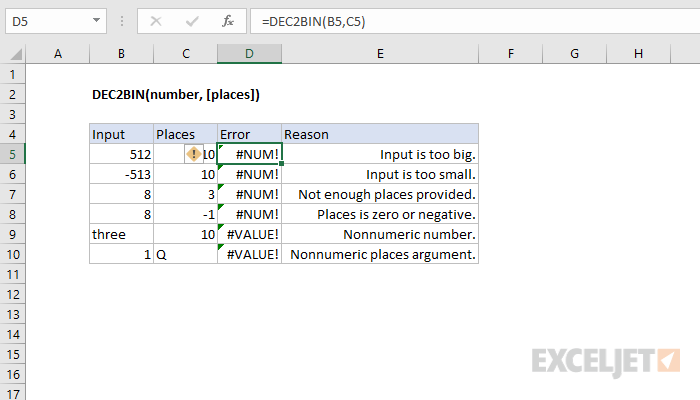
The input must be a valid number within the range [ -512, 511 ].
Errors