Purpose
Return value
Syntax
=CSCH(number)
- number - The hyperbolic angle.
Using the CSCH function
The Excel CSCH function returns the hyperbolic cosecant of an angle. Given the hyperbolic angle of 1, the function returns 0.850918128 as output.
=CSCH(1) // returns 0.850918128
Explanation
The hyperbolic cosecant function is the reciprocal of the hyperbolic sine function.
=1/SINH(a) // equivalent to CSCH(a)
Purpose
Return value
Syntax
=DEGREES(angle)
- angle - Angle in radians that you want to convert to degrees.
Using the DEGREES function
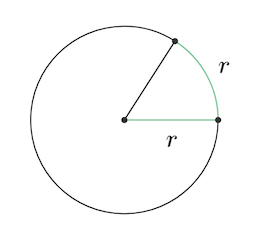
The DEGREES function takes an angle in radians and converts it to degrees. Radians measure angles using the radius of a circle , as illustrated in this image:
To convert degrees back to radians, you can use the RADIANS function .
Converting degrees to radians manually
Because Pi = 180°, the general formula for degrees to radians is degrees * PI()/180 . For example, to convert 45° to radians, the Excel formula would be 45*PI( )/180 which equals 0.7854 radians. More examples in the table below:
| Formula | Degrees |
|---|---|
| =2*PI() | 360 |
| =PI() | 180 |
| =90*PI()/180 | 90 |
| =45*PI()/180 | 45 |
| =30*PI()/180 | 30 |
| =20*PI()/180 | 20 |
