Purpose
Return value
Syntax
=DEC2BIN(number,[places])
- number - The decimal number you want to convert to binary.
- places - [optional] Pads the resulting binary number with zeros up to the specified number of digits. If omitted returns the least number of characters required to represent the number.
Using the DEC2BIN function
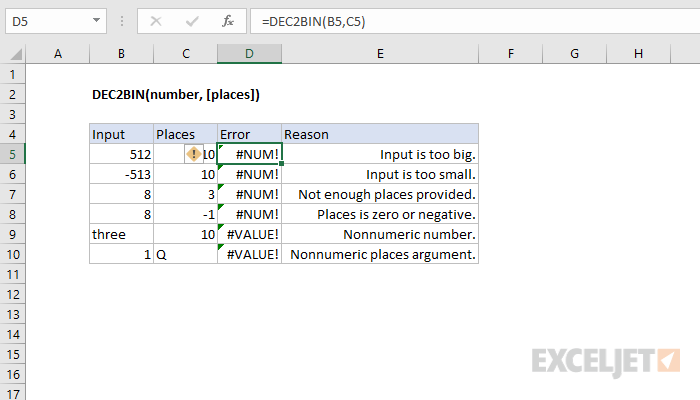
The input must be a valid number within the range [ -512, 511 ].
Errors
Purpose
Return value
Syntax
=DEC2HEX(number,[places])
- number - The decimal number you want to convert to hexadecimal.
- places - [optional] Pads the resulting number with zeros up to the specified number of digits. If omitted returns the least number of characters required to represent the number.
Using the DEC2HEX function
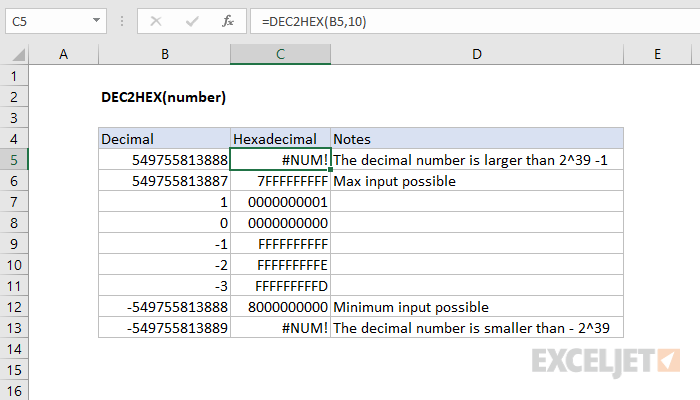
The input must be a valid decimal number within the range [ -2^39, 2^39 - 1 ].
Negative Values
Excel internally represents Hexadecimal numbers in binary using 40 bits. The first bit indicates whether the number is positive or negative. The remaining bits indicate the magnitude of the number. Negative numbers are internally represented in binary using two’s complement notation. Two’s complement notation, when converted to hexadecimal, starts at the highest 10 digit hexadecimal number and goes backwards.