Purpose
Return value
Syntax
=DEGREES(angle)
- angle - Angle in radians that you want to convert to degrees.
Using the DEGREES function
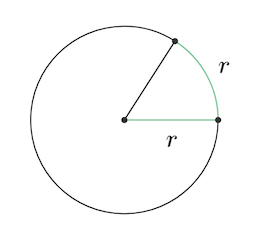
The DEGREES function takes an angle in radians and converts it to degrees. Radians measure angles using the radius of a circle , as illustrated in this image:
To convert degrees back to radians, you can use the RADIANS function .
Converting degrees to radians manually
Because Pi = 180°, the general formula for degrees to radians is degrees * PI()/180 . For example, to convert 45° to radians, the Excel formula would be 45*PI( )/180 which equals 0.7854 radians. More examples in the table below:
| Formula | Degrees |
|---|---|
| =2*PI() | 360 |
| =PI() | 180 |
| =90*PI()/180 | 90 |
| =45*PI()/180 | 45 |
| =30*PI()/180 | 30 |
| =20*PI()/180 | 20 |
Purpose
Return value
Syntax
=RADIANS(angle)
- angle - Angle in degrees to convert to radians.
Using the RADIANS function
The RADIANS function takes an angle in degrees and converts it to radians. Radians measure angles using the radius of a circle. For example, to convert a 45 degree angle to radians the formula is:
=RADIANS(45) // Returns 0.785 or π/4
Explanation

One radian is equal to the amount of rotation required to travel one radius along the circumference of the circle, as seen in the image above. A full-rotation or 360° in radians is equal to the value of 2π. A half-rotation or 180° in radians is equal to the value of geometric constant π (pi) .
= RADIANS(360) =2*PI() // A full rotation is 6.283...
= RADIANS(180) =PI() // A half rotation is 3.141...
Notes
- To convert radians to degrees, see the DEGREES function .
- A full-rotation (360°) in radians is equal to 6.283 or 2π
- A half-rotation (180°) in radians is equal to 3.142 or π (pi).
