Purpose
Return value
Syntax
=EXP(number)
- number - The power that e is raised to.
Using the EXP function
The EXP function finds the value of the constant e raised to a given number, so you can think of the EXP function as e ^(number), where e ≈ 2.718. The exponential function can be used to get the value of e by passing the number 1 as the argument.
=EXP(0) // returns 1
=EXP(1) // returns 2.71828182846 (the value of e)
=EXP(2) // returns 7.38905609893
The exponential function models exponential growth and has the unique property where the output of the function at a given point is proportional to the rate of change of the function at that point. The inverse of the exponential function is the natural logarithm which represents the opposite of exponential growth, exponential decay.
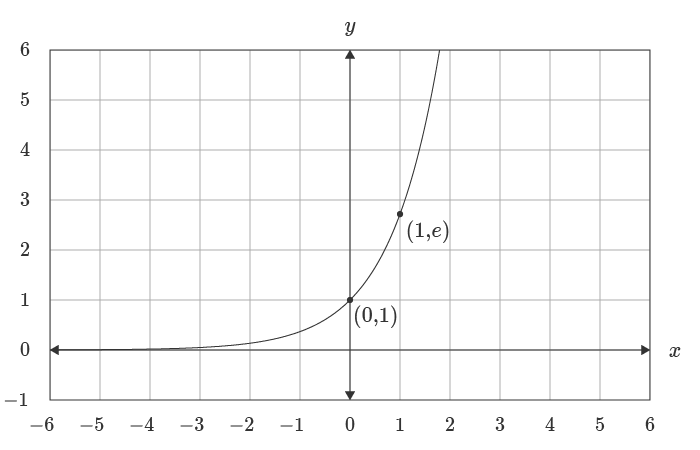
For a more detailed explanation see wumbo.net .
Notes
- e stands for Euler’s number.
- The number e is a famous irrational number, and one of the most important numbers in mathematics.
- The first digits of e are: 2.718281828459…
- e is the base of the Natural Logarithms, invented by John Napier.
Purpose
Return value
Syntax
=FACT(number)
- number - The number to get the factorial of.
Using the FACT function
The Excel FACT function returns the factorial of a given number. In mathematics, the factorial of a non-negative integer n is the product of all positive integers less than or equal to n , represented with the syntax n!
FACT takes just one argument , number , which should be a positive integer. If number is not an integer, the decimal portion of number will be removed before the factorial is calculated.
Examples
=FACT(3) // returns 6
=FACT(4) // returns 24
=FACT(5) // returns 120
If number is not an integer it will be truncated to an integer:
=FACT(3.2) // returns 6
When number is zero, FACT returns 1:
=FACT(0) // returns 1
If number is negative, FACT returns the #NUM! error:
=FACT(-3) // returns #NUM!
Notes
- Number cannot be negative or FACT will return the #NUM error.
- If number is not an integer it will be truncated to an integer, then solved.
