Details
The Problem
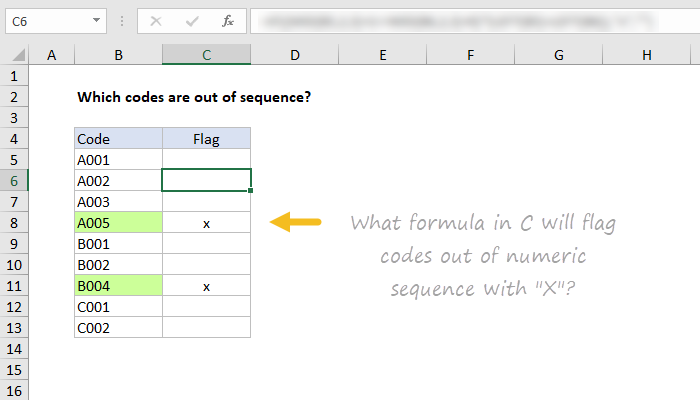
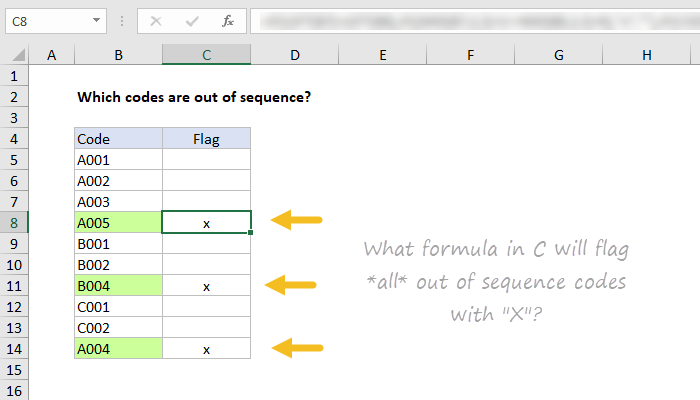
We have a list of alphanumeric codes. Each code consists of a single letter (A, B, C, etc.) followed by a 3-digit number. These codes should appear in alphabetical order, but sometimes they are out of sequence. We want to flag out-of-sequence codes.
Challenge #1
What formula in the “Check” column will place an “x” next to a code that is out of sequence? In this challenge, we are only checking that the numeric portion of the code is out of sequence, not that the letter itself is out of sequence.
Challenge #2
How can the formula above be extended to check if “alpha” part of the code (A,B,C, etc.) is out of sequence? For example, we should flag a code that begins with “A” if it appears after a code that begins with “C” or “B”.
Download the worksheet below and take the challenge!
Note: there are 2 sheets in the workbook, one for Challenge #1, one for Challenge #2.
Hint - This video shows some tips for how to solve a problem like this.
Assumptions
- All codes always contain four characters: 1 uppercase letter + 3 numbers.
- The number of codes per letter is random, but there should be no gaps in numeric values.
- It is only necessary to mark the first code with a letter out of sequence, not all subsequent codes.
Details
The problem
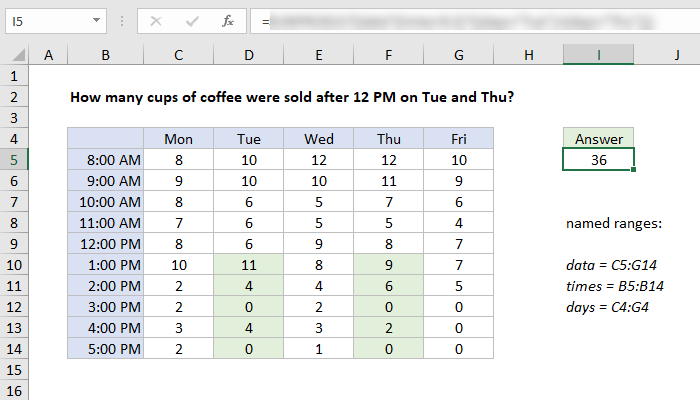
The data below shows cups of coffee sold at a small kiosk for a week at different hours of the day. The times in column B are valid Excel times.
The challenge
What formula in cell I5 will correctly sum the total cups sold after 12:00 PM on Tuesday and Thursday? Relevant cells are shaded in green.
For your convenience, the following named ranges are available:
data = C5:G14 times = B5:B14 days = C4:G4
Download the Excel workbook, and leave your answer as a comment below.
Constraints
- Your formula should dynamically locate the cells to sum, without hardcoded references. In other words, =SUM(D10:D14,F10:F14) is not valid.
- Use named ranges when possible to make your formula easy to read.
