Details
A reader sent me an interesting formula problem this week, so thought I’d share it as a formula challenge. The problem is this:
You have a fixed monthly payment, a start date, and a given number of months. What formula can you use to sum total payments by year, based on the following worksheet:
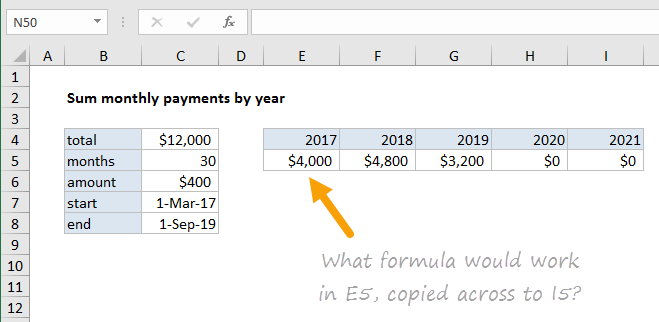
In other words, what formula works in E5, copied across to I5, to get a sum for each year shown?
You can use the following named ranges in your formula if you like: mos (C5), amount (C6), start (C7), end (C8).
You can download the worksheet below.
Details
A couple weeks ago, a reader sent me an interesting question about tracking the “stopped time” for a fleet of trucks. The trucks are tracked by GPS so a location is recorded at each hour of the day for each truck. The data looks something like this:
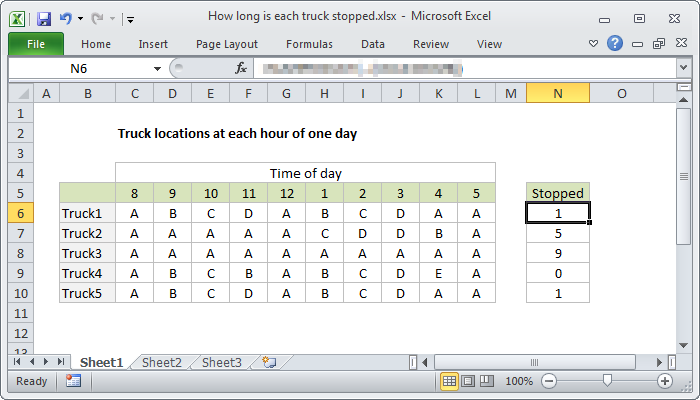
The challenge: what formula in column N will correctly calculate total hours stopped?
I’ve simplified this a bit by replacing actual GPS coordinates with locations labeled A-E, but the concept remains the same.
The puzzle
For how many hours was each truck stopped?
Or, in Excel-speak:
What formula will calculate the total hours each truck was stopped?
For example, we know Truck1 was stopped for 1 hour because its location was recorded as “A” at both 4 PM and 5 PM.
Assumptions
- There are 5 locations with these names: A, B, C, D, E
- A truck at the same location for two consecutive hours = 1 hour stopped
Got a formula that will do it?
