Purpose
Return value
Syntax
=IMEXP(complex_num)
- complex_num - The complex number in the form “x+yi”.
Using the IMEXP function
The Excel IMEXP function returns the exponential of a complex number. For example, given “0+πi” as input, the function returns “-1+3.23108914886517E-15i” as output. The output is essentially -1, but due to floating point precision, it contains a very small imaginary component.
=IMEXP(COMPLEX(0,PI())) // returns -1 + 3.23108914886517E-15i
Given real number input, the function behaves like the exponential function and models exponential growth.
=IMEXP(COMPLEX(1,0)) // returns 2.71828182845905
Given imaginary input representing an angle, the function returns the corresponding point on the unit circle in the complex plane.
=IMEXP(COMPLEX(0,PI()/3)) // returns cos(π/3) + sin(π/3)i
Notation
The complex exponential function often appears as the Latin letter e to some power. This notation is equivalent to passing the complex number as input to the exponential function.

In Excel, we write the exponential of a complex number “z=x+yi” like this:
=IMEXP(COMPLEX(x,y))
Euler’s Formula
The complex exponential function appears in a famous math formula called “Euler’s Formula,” which relates i, π, and -1 together.

We can write another version of this formula that better describes what’s happening in terms of the angle θ.

Given imaginary input representing an angle, the function returns the corresponding point on the unit circle in the complex plane. For example, given the input “i π/3” the function returns the point on the unit circle corresponding to the angle of π/3 radians.

In Excel, we can see this behavior in the following formula:
=IMEXP(COMPLEX(0,PI()/3)) // returns 0.5 + 0.866025404i
Explanation
In math, the exponential of a complex number can be expanded using the additive property of exponentials.

The right expression can be expanded further using Euler’s Formula.

In Excel, the complex exponential function is equivalent to this formula.
=IMPRODUCT(
    COMPLEX(EXP(x), 0),
    COMPLEX(COS(y), SIN(y))
)
From this, we can see the real part of the input governs the magnitude of the output, and the imaginary part of the input governs the phase (angle) of the output. For example, given the input “2+π/3”, the function returns a complex number with a magnitude of EXP(2) and an angle of π/3 radians.
=IMEXP(COMPLEX(2,PI()/3)) // returns 3.694528049 + 6.399110292i
We can draw the returned complex number in the complex plane like this.

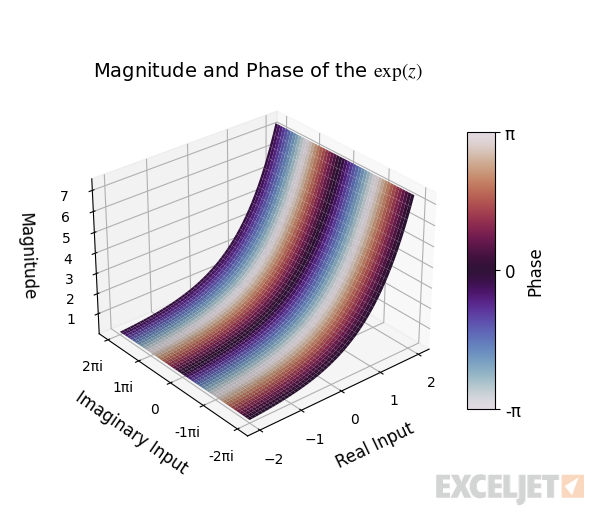
In general, the function’s output can be visualized with the 3D plot below. The horizontal XY plane represents input in the complex plane, and the vertical axis represents the magnitude of the output. The plot’s surface is colored using the output’s phase (angle).
Polar Form
The complex exponential function can express a complex number in its polar form by describing the number in terms of its radius and angle.

For example, to write the complex number z in Excel with a radius of 5 and an angle of π/4, we scale the point on the complex unit circle given by EXP(iθ) by the radius like this:
=IMPRODUCT(
    COMPLEX(5,0),
    IMEXP(COMPLEX(0,PI()/4))
) // returns 3.535533906 + 3.535533906i
We can draw this complex number on the complex plane to visualize its coordinates.

Inverse
The inverse of the complex exponential function is the complex natural logarithm. For example, if we pass the output of the exponential function for “2+πi” to the natural logarithm, we get “2+πi” as a result.
=IMLN(IMEXP(COMPLEX(2,PI()))) // returns 2 + πi
In general, given a complex number, the natural logarithm function returns the natural logarithm of the radius of the number for the real part and the angle of the number for the imaginary part.

Sometimes, this can result in a branch cut, where a different-but-equivalent angle is returned instead.
=IMLN(IMEXP(COMPLEX(2,3*PI()))) // returns 2 + πi
This is discussed in more depth in the complex natural logarithm article.
Images courtesy of wumbo.net .
Purpose
Return value
Syntax
=IMLN(complex_num)
- complex_num - The complex number in the form “x+yi”.
Using the IMLN function
The Excel IMLN function returns the natural logarithm of a complex number. For example, given the complex number “3+4i” as input, the function returns the logarithm of the complex number.
=IMLN(COMPLEX(3,4)) // returns 1.6094379124341 + 0.927295218001612i
The real part of the output is equal to the natural logarithm of the distance from the origin to the point “3+4i” in the complex plane.
=LN(IMABS(COMPLEX(3,4))) // returns 1.609437912
The imaginary part of the output is equal to the angle in radians of the complex number relative to the positive real axis.
=IMARGUMENT(COMPLEX(3,4)) // returns 0.927295218
Explanation
Given a complex number z , the complex logarithm is defined as:

- The radius r represents the distance from the origin to the point z in the complex plane.
- The angle θ represents the angle in radians of the complex number z relative to the positive real axis.

In Excel, the complex logarithm is equal to the following formula where cell B6 contains a complex number:
=COMPLEX(LN(IMABS(B6)),IMARGUMENT(B6))
Visualizing the Output
The 3D graph below visualizes the real part of the function’s output. The horizontal XY -plane represents the input in the complex plane, and the vertical axis represents the function’s real output.
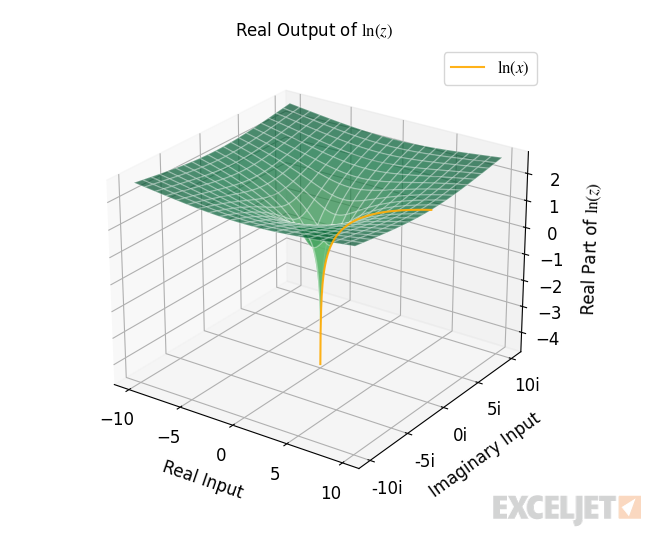
Geometrically, the real part of the function’s output equals the natural logarithm of the distance from the origin to the point in the complex plane.
=IMREAL(IMLN(COMPLEX(3,4))) // returns 1.609437912434100
The 3D graph below visualizes the imaginary part of the function’s output. The horizontal XY -plane represents the input in the complex plane, and the vertical axis represents the function’s imaginary output.
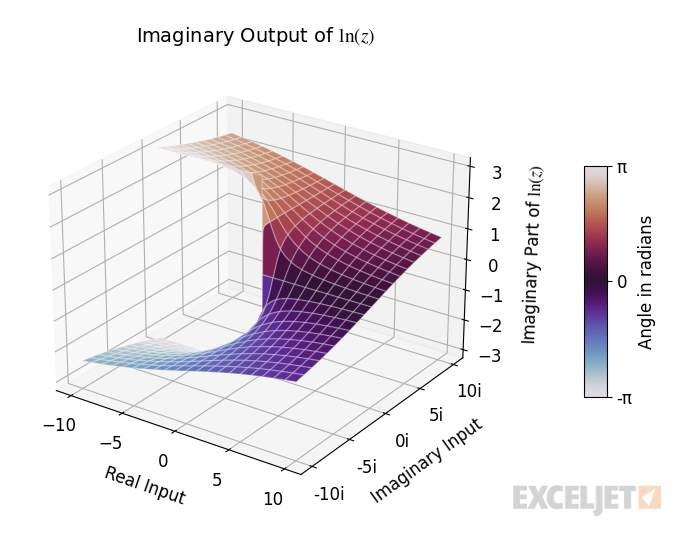
Geometrically, the imaginary part equals the angle in radians of the complex number output by the function.
=IMAGINARY(IMLN(COMPLEX(3,4))) // returns 0.927295218
Relationship to the Exponential
In the context of complex numbers, the logarithm and exponential function have a slightly different relationship than they do in the context of real numbers, where they are inverses of each other. Their relationship is the same when you pass the output of the logarithm to the exponential; the result is the original input.
=IMEXP(IMLN(COMPLEX(x,y))) // always returns x+yi
However, their relationship is different when you pass the output of the exponential to the logarithm; the result isn’t necessarily the original input.
=IMLN(IMEXP(COMPLEX(x,y))) // doesn't necessarily return x+yi
The difference is because of the exponential function’s periodic nature. For example, consider a complex number written in terms of its radius and angle (polar form).

The angle that describes the number can take on infinitely many values. Because if you add 2π to any angle, you get an equivalent complex number. This is why the complex logarithm is multivalued and could be expressed like this, where k is some integer.

To make the complex logarithm single-valued, the angle is restricted to a particular range from -π to π. This is called a branch cut , and it removes the ambiguity of the multiple angles that can describe the same complex number. The consequence of the branch cut is the function sometimes returns an equivalent angle mapped to the range from -π to π, which includes π and excludes -π.
For example, given the expression IMEXP(“2 + 3π i”) as input, the complex logarithm returns “2+π i”.
=IMLN(IMEXP(COMPLEX(2,3*PI()))) // returns 2+πi
Branch Cut
The behavior of the complex logarithm for its branch cut can be demonstrated with the complex number “-1-1i”. If you rotate the positive direction to the point in the complex plane, the rotation is equal to 5/4 π radians. Equivalently, if you rotate in the negative direction to the point in the complex plane, the rotation is equal to -3/4 π radians.

In this case, the complex logarithm returns the branch cut from -π to π, so the returned angle is -3/4 π.
=IMAGINARY(IMLN(COMPLEX(-1,-1))) // returns -3/4π
Of course, many more angles correspond to the point “-1-1i”. Any angle outside the range -π to π gets mapped to the branch cut.
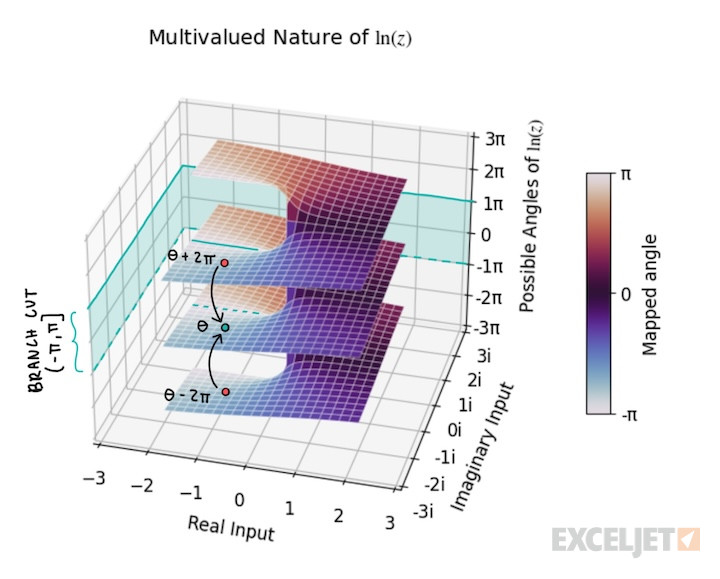
The range of the branch cut is (-π, π], which excludes -π and includes π. This means that for points that lie on the negative real axis, where the branch cut occurs, the returned angle is π.
=IMAGINARY(IMLN(COMPLEX(-1,0))) // returns π
The discontinuous jump of the branch cut is visualized by the 3D plot below.

Images courtesy of wumbo.net .
Notes
- The function returns a #NUM! error when given zero input
