Purpose
Return value
Syntax
=IMPOWER(inumber,number)
- inumber - A complex number.
- number - Power to raise number.
Using the IMPOWER function
The Excel IMPOWER function returns a complex number raised to a given power. The complex number is input as text, and must be in the form x + yi or x + yj.
For example:
=IMPOWER("1+2i",2) // returns "-3+4i"
In the example shown, the formula in D6, copied down, is:
=IMPOWER(B6,C6)
Notes:
- Only lowercase “j” and “i” are accepted by IMPOWER. Other values will result in the #NUM error.
- The number argument must be numeric
Purpose
Return value
Syntax
=IMPRODUCT(inumber1,[inumber2],...)
- inumber1 - Complex number 1.
- inumber2 - [optional] Complex number 2.
Using the IMPRODUCT function
The Excel IMPRODUCT function returns the product of one or more complex numbers. For example:
=IMPRODUCT("1+2i", "3+5i") // returns -7+11i
Excel handles complex numbers as strings formatted like “x+yi” or “x+yj”. Use the COMPLEX function to get the string representing a complex number.
Examples
The IMPRODUCT function takes in two or more arguments in the form of inumber1 , inumber2 , and so on. Arguments can be hard-coded values, cell references, or a range. To calculate the product of multiple complex numbers in a range, use the function like this:
=IMPRODUCT(B6:B10) // multiply the complex numbers in B6:B10
If Excel encounters values not recognized as complex numbers, a #NUM! Error is thrown.
=IMPRODUCT("1+2i", "invalid input") // throws #NUM! error
Explanation
The product of two complex numbers is visualized by transforming the coordinate system according to one of the numbers and drawing the second number using the transformed coordinate system. For example, the product of “1+2i” and “3+5i” is visualized by transforming the coordinate system (shown in blue) so that one (drawn as the green arrow) goes to the number “3+5i” in the complex plane. When we draw the transformed position of “1+2i” its tip sits at “-7+11i” which is the product of the two numbers.
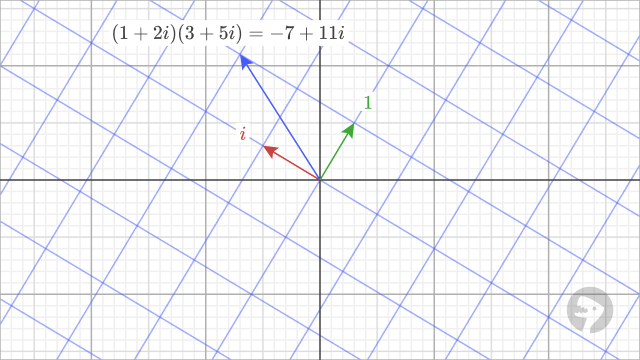
=IMPRODUCT("1+2i", "3+5i") // returns -7+11i
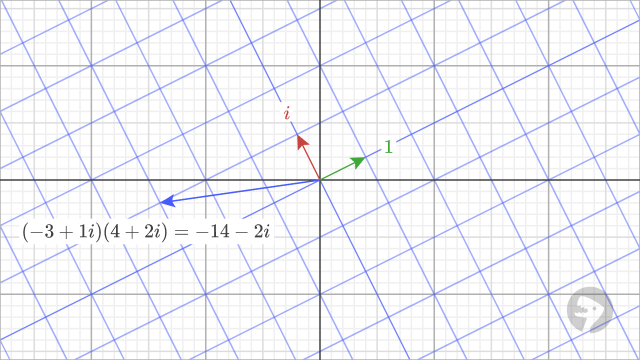
Let’s visualize another example. The product of “-3+i” and “4+2i” is visualized by transforming the coordinate system so that one goes to “4+2i”. When we draw “-3+i” in the transformed coordinate system, the tip lies at “-14-2i,” which is the product of the two numbers.
Images courtesy of wumbo.net
