Nominal data, also called categorical data, does not have does not have a natural sequence. Instead, the data is typically in named categories or labels without numeric significance.
For example, a survey question that asks for a favorite beverage, with choices of coffee, tea, water, or milk will generate nominal data in 4 categories as in the above bar chart.
When you hear “nominal”, think “named” as in “named categories”. Other examples of nominal data would be male/female, eye color, make of car, etc.
A number format in Excel is a special code that controls how a number is displayed on the worksheet. For example, the number 0.51 can be displayed as 51% with the number format:
0.0%
The date January 1, 2021 can be displayed as “1-Jan-20” with the number format:
d-mmm-yy
The most important thing to understand about number formats is that they control the display of numbers only – number formats have no effect on underling numeric values. There are quite a few number formats built into Excel, including:
- General format
- Currency format
- Percentage format
- Scientific format
- Date format
- Time format
- Custom formats
You can apply number formats from the Home tab of the ribbon:
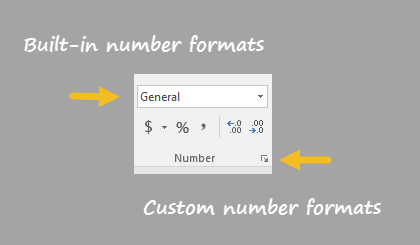
Excel also allows custom number formats . For a more complete description of custom number format codes see: Custom Number Formats .
