Purpose
Return value
Syntax
=PERCENTILE(array,k)
- array - Data values.
- k - Number representing kth percentile.
Using the PERCENTILE function
The Excel PERCENTILE function calculates the “kth percentile” for a set of data. A percentile is a value below which a given percentage of values in a data set fall. A percentile calculated with .4 as k means 40% percent of values are less than or equal to the calculated result, a percentile calculated with k = .9 means 90% percent of values are less than or equal to the calculated result.
To use PERCENTILE, provide a range of values and a number between 0 and 1 for the " k " argument, which represents percent. For example:
=PERCENTILE(range,.4) // 40th percentile
=PERCENTILE(range,.9) // 90th percentile
You can also specify k as a percent using the % character:
=PERCENTILE(range,80%) // 80th percentile
PERCENTILE returns a value greater than or equal to the specified percentile.
In the example shown, the formula in G5 is:
=PERCENTILE(scores,E5)
where “scores” is the named range C5:C14.
Note: Microsoft classifies PERCENTILE as a " compatibility function “, now replaced by the PERCENTILE.INC function.
Notes
- k can be provided as a decimal (.5) or a percentage (50%)
- k must be between 0 and 1, otherwise PERCENTILE will return the #NUM! error.
- When percentiles fall between values, PERCENTILE will interpolate and return an intermediate value.
Purpose
Return value
Syntax
=PERCENTILE.EXC(array,k)
- array - Data values.
- k - A value between 0 and 1 that represents the k:th percentile.
Using the PERCENTILE.EXC function
The Excel PERCENTILE.EXC function calculates the “kth percentile” for a set of data. The kth percentile is a value below which k percent of values in the data set fall. A percentile calculated with .4 as k means 40% percent of values are less than or equal to the calculated result, a percentile calculated with k = .9 means 90% percent of values are less than or equal to the calculated result.
To use PERCENTILE.EXC, provide a range of values and a number between 0 and 1 for the " k " argument, which represents percent. For example:
=PERCENTILE.EXC(range,.4) // 40th percentile
=PERCENTILE.EXC(range,.9) // 90th percentile
You can also specify k as a percent using the % character:
=PERCENTILE.EXC(range,80%) // 80th percentile
In the example shown, the formula in G5 is:
=PERCENTILE.EXC(scores,E5)
where “scores” is the named range C5:C14.
PERCENTILE.INC vs. PERCENTILE.EXC
The reason the PERCENTILE.EXC function is exclusive is because the function excludes percentages from 0 to 1/(N+1) as well as N/(N+1) to 1, where N is the size of the input array. On the other hand, PERCENTILE.INC includes the full range from 0 to 1 as valid k values.
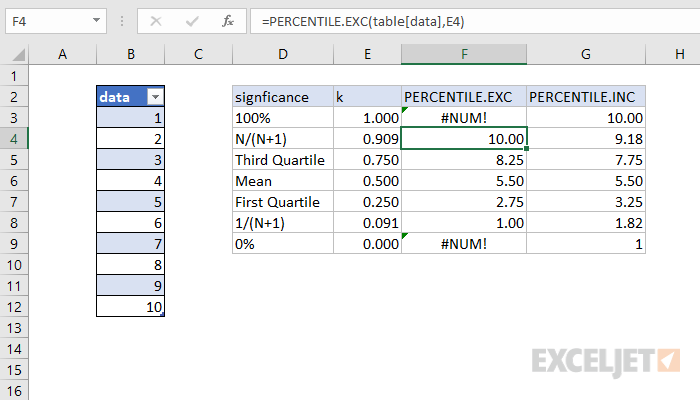
Effectively, PERCENTILE.EXC will always choose a value farther away from the mean of the data set, compared to PERCENTILE.INC. Note that both functions map to the full range of data.
Error Values
PERCENTILE.EXC will return the #NUM error if k is less than 1/(n+1) or greater than n/(n+1). In the example shown, where the array contains 10 values, the minimum value for k is 0.091 and the maximum is 0.909.
Note: Microsoft classifies PERCENTILE as a " compatibility function “, now replaced by the PERCENTILE.INC function.
Notes
- k can be provided as a decimal (.5) or a percentage (50%)
- k must be between 0 and 1, or PERCENTILE.EXC will return the #NUM! error.
- PERCENTILE.EXC will return the #NUM error if k is less than 1/(n+1) or greater than n/(n+1).
- PERCENTILE.EXC will interpolate when k is not a multiple of 1/(n+1).
