Purpose
Return value
Syntax
=PERMUTATIONA(number,number_chosen)
- number - The total number of items.
- number_chosen - The number of items in each combination.
Using the PERMUTATIONA function
The Excel PERMUTATIONA function returns the number of permutations (combinations where order is significant) for a given number of items. The PERMUTATIONA function allows repetitions. To calculate the number of permutations without repetitions, use the PERMUT function .
A permutation is a combination where order matters. In other words, a permutation is an ordered combination. There are two types of permutations:
- Permutations where repetition is not allowed (i.e. 123)
- Permutations where repetition is allowed (i.e. 333)
The PERMUTATIONA function calculates permutations where repetitions are allowed. To calculate permutations where repetitions are not allowed, use the PERMUT function .
Example
To use PERMUTATIONA, specify the total number of items and " number_chosen “, which represents the number of items in each combination. For -example, to calculate 3-number permutations for the numbers 0-9, there are 10 numbers and 3 chosen, so the formula is:
=PERMUTATIONA(10,3) // returns 1000
You can see this result in cell D8 in the example shown.
Notes
- A permutation is a group of items in which order/sequence matters .
- If order is not significant, see the COMBIN function .
- Arguments that contain decimal values are truncated to integers.
- PERMUTATIONA returns a #VALUE! error value if either argument is not numeric.
Purpose
Return value
Syntax
=PHI(x)
- x - The value (z-score) for which you want the density of the standard normal distribution.
Using the PHI function
The PHI function calculates the value of the probability density function for a standard normal distribution at a given point. The standard normal distribution is a normal distribution with a mean of 0 and a standard deviation of 1. The PHI function is often used in statistical analysis, data science, and financial modeling to understand how likely a value is within a standard normal distribution.
For example, the following formula returns the value of the standard normal density function at 1:
=PHI(1) // returns 0.241970725
Key features
- Returns the relative likelihood of a value in the standard normal distribution
- Useful for statistical analysis, anomaly detection, and model building
- Works only with standard normal distributions (mean = 0, standard deviation = 1)
Note: PHI returns the value of the density function, not the cumulative probability. PHI is equivalent to NORM.S.DIST with the cumulative flag set to FALSE. To get the cumulative probability, use NORM.S.DIST with the cumulative flag set to TRUE.
- Key features
- Example #1 - Basic usage
- Example #2 - Using z-scores
- Example #3 - Error handling
- When to use
- Related functions
Example #1 - Basic usage
The PHI function takes a single argument, x , and returns the value of the standard normal density function at that point:
=PHI(-2) // returns 0.053990967
=PHI(-1) // returns 0.241970725
=PHI(0)  // returns 0.398942280
=PHI(1)  // returns 0.241970725
=PHI(2)  // returns 0.053990967
Example #2 - Using z-scores
The PHI function can be used to calculate PDF values for normal distributions with different means and standard deviations. For example, suppose you have a list of values from a normal distribution with a mean of 83 and a standard deviation of 5. To find the probability density for each value, you first calculate the z-score, then use the PHI function.
=PHI(STANDARDIZE(93,83,5)) // returns 0.0539909665
The z-score of a value, which measures how many standard deviations a value is from the mean, can be calculated using the STANDARDIZE function:
=STANDARDIZE(93,83,5) // returns 2
or manually like this:
z = (value - mean) / stdev
The following table shows the density for each value in the normal distribution with a mean of 83 and a standard deviation of 5:
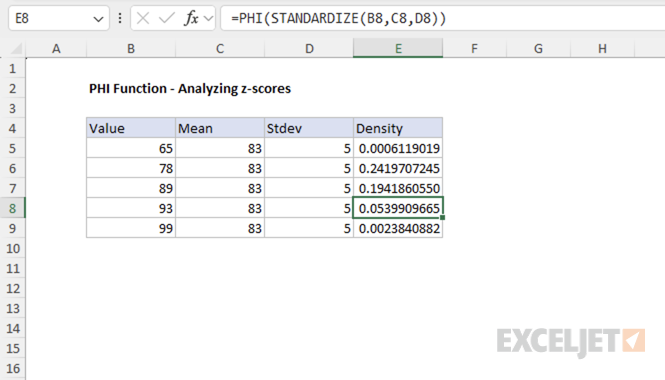
This approach allows you to use PHI to calculate the PDF for any normal distribution, not just the standard normal.
Example #3 - Error handling
The PHI function returns the #VALUE! error if x is not numeric.
=PHI("apple") // returns #VALUE!
When to use
Use the PHI function when you need the value of the standard normal density function (mean = 0, standard deviation = 1) at a specific point. PHI is equivalent to NORM.S.DIST(x, FALSE) . For cumulative probability, use NORM.S.DIST(x, TRUE) .
If you need the density for a normal distribution with a different mean or standard deviation, first convert your value to a z-score (see Example #2), or use the NORM.DIST function.
Related functions
Excel provides several related functions for working with normal distributions:
- NORM.S.DIST - Returns the cumulative distribution or density for the standard normal distribution.
- NORM.DIST - Returns the cumulative distribution or density for a normal distribution with specified mean and standard deviation.
- NORM.INV - Returns the inverse of the normal cumulative distribution.
- STANDARDIZE - Converts a value to a z-score.
