Purpose
Return value
Syntax
=QUARTILE(array,quart)
- array - A reference containing data to analyze.
- quart - The quartile value to return.
Using the QUARTILE function
Use the QUARTILE function to get the quartile for a given set of data. QUARTILE takes two arguments, the array containing numeric data to analyze, and quart , indicating which quartile value to return. The QUARTILE function accepts 5 values for the quart argument, as shown in the table below.
| Quart | Return value |
|---|---|
| 0 | Min value |
| 1 | First quartile – 25th percentile |
| 2 | Median value – 50th percentile |
| 3 | Third quartile – 75th percentile |
| 4 | Max value |
Purpose
Return value
Syntax
=QUARTILE.EXC(array,quart)
- array - A reference containing data to analyze.
- quart - The quartile value to return, 1-3.
Using the QUARTILE.EXC function
Use the QUARTILE.EXC function to get the quartile for a given set of data. QUARTILE.EXC takes two arguments, the array containing numeric data to analyze, and quart, indicating which quartile value to return. The QUARTILE.EXC function accepts 3 values for the quart argument, as shown in the table below.
| Quart | Return value |
|---|---|
| 1 | First quartile – 25th percentile |
| 2 | Median value – 50th percentile |
| 3 | Third quartile – 75th percentile |
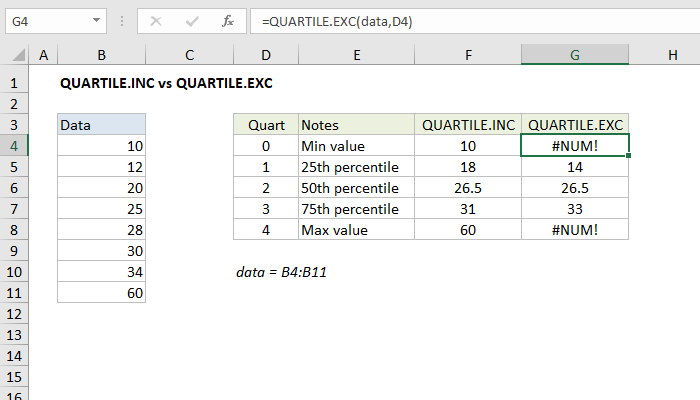
QUARTILE.INC vs QUARTILE.EXC
Percentiles can be defined as “greater than or equal to” (inclusive) or “greater than” (exclusive). The QUARTILE.INC function is inclusive and has “greater than or equal to” behavior. QUARTILE.EXC is exclusive, and has “greater than” behavior. The screen below shows how QUARTILE.INC and QUARTILE.EXC return different results for the same data. Note QUARTILE.EXC cannot be used to get the minimum or maximum value like QUARTILE.INC.
Note: Starting with Excel 2010, the QUARTILE.EXC and QUARTILE.INC functions replace the QUARTILE function , which is now classified as a compatibility function .
