Purpose
Return value
Syntax
=SECH(number)
- number - The hyperbolic angle.
Using the SECH function
The Excel SECH function returns the hyperbolic secant of a hyperbolic angle angle. Given 2 as input, the function returns 0.265802229 as output.
=SECH(2) // returns 0.265802229
Explanation
The hyperbolic secant is the reciprocal of the COSH function.
=1/COSH(x) // equivalent to SECH(x)
The plot below show’s the function’s output in Excel.

Purpose
Return value
Syntax
=SIN(number)
- number - The angle in radians for which you want the sine.
Using the SIN function
The SIN function returns the sine of an angle provided in radians. In geometric terms, the sine of an angle returns the ratio of a right triangle’s opposite side over its hypotenuse. For example, the sine of PI()/6 radians (30°) returns the ratio 0.5.
=SIN(PI()/6) // Returns 0.5
Using Degrees
To supply an angle to SIN in degrees, multiply the angle by PI()/180 or use the RADIANS function to convert to radians. For example, to get the SIN of 30 degrees, you can use either formula below:
=SIN(30*PI()/180)
=SIN(RADIANS(30))
Explanation
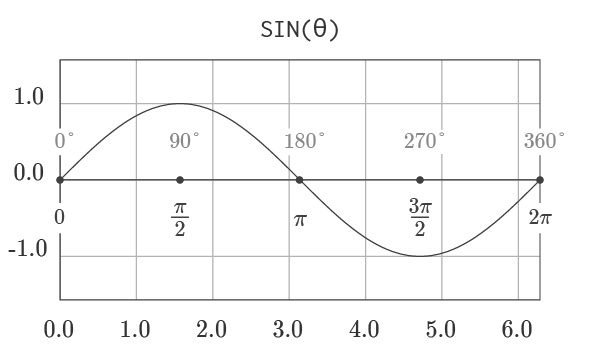
The graph of sine, shown above, visualizes the output of the function for all angles from 0 to a full rotation. The function is periodic, so after a full rotation, the output of the function repeats. Geometrically, the function returns the y -component of the point corresponding to an angle on the unit circle. The function’s output will always be in the range [-1, 1].
Graph courtesy of wumbo.net .
