Which countries have the longest life expectancy? Bar charts work well for this kind of data because (1) the bars are easy to compare and (2) there is plenty of room for labels on the vertical axis.
Here is the data used to plot this chart:

How to make this chart
- Hold down control key and select ranges as shown above
- Click the insert column icon at Insert > charts
- Select the first 2d option
- The chart as inserted
- Select vertical axis; reverse sort order and set interval to 1
- Add data Labels
- Select data series and set bar width
- Select and delete gridlines
- Select and delete horizontal axis
- Set title as desired
- Final chart after changes
Pie charts are one of the simplest chart types in Excel, good for showing “part-to-whole” relationships with data in a small number of categories. Pie charts get a lot of criticism in the professional data visualization world, but they are compact and effective when the number of categories is small (2-5) and the relative size of each category is clear. In this example, a pie chart is used to plot the results of the survey question “What’s your favorite flavor of ice cream?”.
The data used for this pie chart is below:
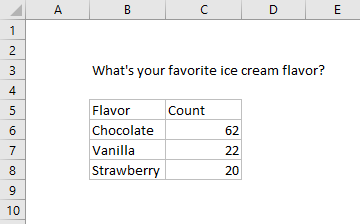
Note data does not include percentage breakdown — this is handled directly in the chart.
How to make this chart
- Select the data, then Insert > Pie chart on the ribbon:
- Chose the first 2D pie option:
- Initial chart after insert:
- Select and delete the legend
- Add data labels:
- Select data labels, and set display to show category name and percentage with a new line separator:
- Set data label text to white (if desired)
- Final chart with title:
