About This Shortcut
Unhide any hidden rows that intersect the current selection.
About This Shortcut
Unhide any hidden columns that intersect the current selection.
Notes:
(1) May not work in Excel 2010 on Vista or Windows 7. Discussion and fix is here: http://superuser.com/questions/183197/whats-the-keyboard-shortcut-to-unhide-a-column-in-excel-2010
(2) May not work in Excel 2007. See http://www.techrepublic.com/blog/microsoft-office/office-solution-keyboard-shortcuts-for-hiding-and-unhiding-columns-and-rows/
(3) In Windows 10, there is a conflict with a keyboard-switching shortcut. You can resolve this by unassigning the keyboard layout hot key. You may need to unassign the input language as well.
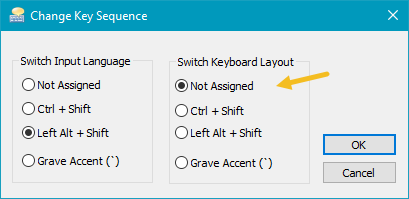
This is a tricky setting to find. You are looking for Advanced Keyboard Settings, under Region and Language.
Update June 2021: if the shortcut stops working after a Windows update, try assigning and then unassigning the switch keyboard layout.
Update February 2022: Can’t get the above trick to work. Let us know if you find a solution.
